• Hey Guest. Check out your NeoGAF Wrapped 2025 results here!

Steam Machine |OT| There Are Dozens of Us. Dozens!

Awesome, glad you got it working! If you want to tweak the framegen model or various settings, the keyboard shortcut is just pressing "Insert". You can map a button in Steam Input (either globally, or per game) to the input key, so that pressing that button brings up your framegen options as an overlay. Kinda handy since it really lets you get into the nuts and bolts of how it's working.
Man, it's so great that we're already seeing community support like this at launch. That's one of the reasons I wasn't afraid to jump in.

I thought we'd have to wait for a while for FSR 4.1 stuff. Absolutely love it.

I've already played Trails in the Sky 1st Chapter for about 3-4 hours more than I would have otherwise, since I got this thing.

Looking forward to DownLikeBCPowder DownLikeBCPowder 's impressions and hoping that hououinkyouma00 hououinkyouma00 gets an email today 🤞
 
One might even say, play has no limits. :)
giphy.gif
 
Thank you so much guys! I'm going to give these a try here (probably this weekend when I have more time to tinker). Bookmarking your posts!

I just tried Metaphor ReFantazio at 1440p and it's a locked 60 at max graphics in the little testing I did. Amazing. I had a hard time running this one on the Legion Go S Z1E (from what I recall).

I couldn't be happier with the Steam Machine. It's even better than I was thinking. It's ruining my work days 😂

Another useful app, if some games aren't launching with Stock/Experimental Protons, is to install Custom Proton versions through this app.

GE-Proton, DW-Proton, EM-Proton and ProtonCachyOS are available there to download.

Most popular is CachyOS version, which incorporates stuff for FSR4 EM built. And it's upstreaming any patches that Valve does to stock Proton fairly often plus it incorporates Protonfixes for some titles which automatically applies launch parameters for user, I think. Since I could stop using some of launch parameters for older games and they did launch out of the box on custom Protons lately.

DW is mostly Proton with fixes for Gatcha games like Genshin Impact, NTE, Arknights Endfield.

EM moved next to improving winewayland driver and compatiblity with ACE Anticheats. So by time next version of his custom Proton drops it could be something awesome, like him adding FSR4 to RDNA3 and 4 way earlier than Valve's Stock Proton did.
Also looking at https://github.com/CachyOS/proton-cachyos/releases it seems new version dropped but I'm not bumping for just that - also they seem to have added 4.1.1 DLL for FSR4 from Proton Experimental so there's no need to use variable and it auto-downloads now.

Just scrolled down to version Version 11.0-20260601

And saw this bit about Proton-CachyOS OptiScaler integration (I forgot about it)

  • Changed PROTON_USE_OPTISCALER to also download DLSS dlls by default in order to enable DLSS inputs for FSR4. Issue: #214
  • Added PROTON_OPTISCALER_CONFIG to write arbitrary configuration in OptiScaler.ini when using PROTON_USE_OPTISCALER.
    • The config is a semicolon (;) separated string of individual options. The template for each option is {section}.{option}={value}, for example PROTON_OPTISCALER_CONFIG="Upscalers.Dx11Upscaler=fsr31;Upscalers.Dx12Upscaler=dlss". To avoid mistakes, only config options that already exist in Optiscaler.ini can be modified.
    • The changes to the config are permanent until OptiScaler is upgraded or downgraded to a different version. To modify a setting it has to either be manually edited or altered by applying a different config through the environment variable.
    • Be careful, using this will also remove any comments from the OptiScaler.ini file. Keep a backup or refer to the repo for documentation of the various settings.

Durin Durin
 
Last edited:
Also looking at https://github.com/CachyOS/proton-cachyos/releases it seems new version dropped but I'm not bumping for just that.

Just scrolled down to version Version 11.0-20260601

And saw this bit about Proton-CachyOS OptiScaler integration (I forgot about it)
Thanks for the update!

I ran across this video while eating lunch. It's AI voice narrated, but the content itself seemed useful. I just don't know enough to confirm its validity.


Are these the appropriate steps, from what you can tell, to get FSR 4.1.1 working? Proton Experimental is a new concept to me.

jshackles jshackles are we using the right FSR with our Decky Framegen? I noticed in the video that he actually chose 4.1.1 in the Decky menu. I don't recall seeing that menu option when I was messing around this morning. Just some instructions on choosing DLSS while in the game.

I'm flying by the seat of my pants here, but trying to learn and understand :)
 
giphy.gif


Enjoy!! It was such a joy to unbox and set up, man. Hope your experience is as good as ours!
For now I'm focusing on filling out the library with smaller titles that I know I'll be checking out from time to time or I just want to try out. And I'll queue up the big downloads for later tonight and tomorrow morning.
 
Thanks for the update!

I ran across this video while eating lunch. It's AI voice narrated, but the content itself seemed useful. I just don't know enough to confirm its validity.


Are these the appropriate steps, from what you can tell, to get FSR 4.1.1 working? Proton Experimental is a new concept to me.

jshackles jshackles are we using the right FSR with our Decky Framegen? I noticed in the video that he actually chose 4.1.1 in the Decky menu. I don't recall seeing that menu option when I was messing around this morning. Just some instructions on choosing DLSS while in the game.

I'm flying by the seat of my pants here, but trying to learn and understand :)

Honestly, I've always just defaulted to Proton Experimental in Steam globally, and default to GE-Proton for non-Steam games. Need to mess around more with the Cachy one.

Only times where experimental might not work is with really old games sometimes, where ProtonDB usually has someone recommend an older version, and GE-Proton has custom fixes for certain games.
 
Set a variety of junk to download and will mess around a bit later this evening, but probably not too much considering how late it is. Some larger games too, like DOOM 2016 etc. Keyboard and mouse seem to just work seamlessly - I turn them on and boom they're working as functional inputs, very nice.

The one game I did try so far, Geometry Wars, runs fine, but anytime I try to adjust the resolution up from potato the screen just goes black and I can't do anything except go back out to the Steam menu - pretty weird. I tried changing the default resolution in the game properties too, but it still launches in super low resolution for whatever reason. Aside from that it plays really well with the Steam Controller. Admittedly as soon as I picked it up I had concerns dual analog would not feel very good, but in the couple minutes I tried of Geometry Wars it felt promising. Will give it some more time later.

Pretty slick little setup, I do like it so far. I'm surprised at some games that aren't "verified" to work on the Linux, but I'll try some out later and see what happens.

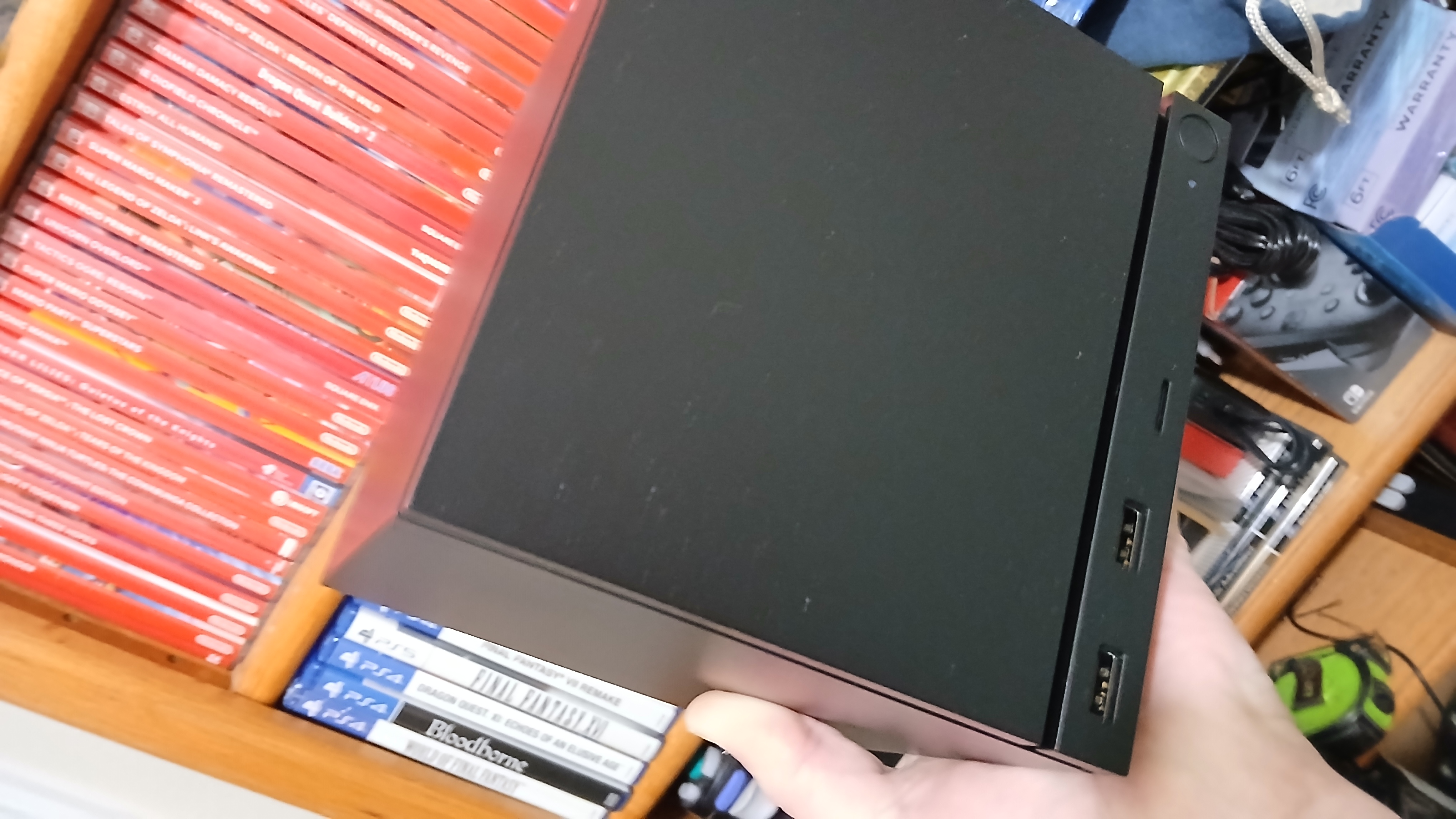
Nice that it has an SD card slot, an easy way to temporarily boost storage capacity without going the whole nine yards of replacing the hard drive yet. Overall my initial impressions are very positive with just setup and initial tinkering. I really like the packaging and design of the unit.

I also didn't realize or think about that I could "install" games via file transfer from other computers on the network or I would have preloaded many things on my desktop in anticipation to save download time! Derp.
 
Last edited:
If only this could have landed just a couple years ago, with a normal-ish price ($699?) and 2x8GB RAM (because sourcing would have still been doable), it would have been SO great.

The SteamOS PCcube concept and performance is incredible for the right price point.
 
Last edited:
If only this could have landed just a couple years ago, with a normal-ish price ($699?) and 2x8GB RAM (because sourcing would have still been doable), it would have been SO great.

The SteamOS PCcube concept and performance is incredible for the right price point.
Not sure Steam OS and drivers were ready then for external GPUs. Hasn't that been the hold up all this time, not necessarily the materials. Anyhow you can buy your own machine and slap Steam OS on it at long as your running AMD gpu its pretty much set and forget. Or you can wait till Nvidia gets their drivers up, in about a year hopefully.
 
I have all of these preordered on GMG. They're going to be perfect for the Machine 🔥

Looking forward to these as well. Have Final Fantasy and Castlevania preordered too. Need to pick up Dragon Quest.

What a time to be alive.
 
Our boy VGEsoterica VGEsoterica showcasing emulation on the Machine. This is my project for tomorrow.

 
Our boy VGEsoterica VGEsoterica showcasing emulation on the Machine. This is my project for tomorrow.


He's absolutely correct about using Emudeck. Makes batch installation and setup of emulators so much easier, Steam Rom Manager exports everything to run easily in Steam gaming mode, and you get custom Steam Input controller templates that bind emulator functions like save states or adjusting settings on the fly to the trackpads as radial menus.

Only thing I'd suggest is adding Citron or Eden manually with Bios files for improved Switch emulation, since it only gives you Ryujinx to download automatically. Everything else is covered though.
 
Last edited:
He's absolutely correct about using Emudeck. Makes batch installation and setup of emulators so much easier, Steam Rom Manager exports everything to run easily in Steam gaming mode, and you get custom Steam Input controller templates that bind emulator functions like save states or adjusting settings on the fly to the trackpads as radial menus.

Only thing I'd suggest is adding Citron or Eden manually with Bios files for improved Switch emulation, since it only gives you Ryujinx to download automatically. Everything else is covered though.
The only Linux experience I have was running some headless Ubuntu crypto miners like 13 years ago. That has long since faded from my memory I need it good few afternoons to sit down with this thing and kind of learn the basics of all this stuff you guys are talking about and in general the feel of the machine in its native format desktop mode I guess you call it.
 
The only Linux experience I have was running some headless Ubuntu crypto miners like 13 years ago. That has long since faded from my memory I need it good few afternoons to sit down with this thing and kind of learn the basics of all this stuff you guys are talking about and in general the feel of the machine in its native format desktop mode I guess you call it.
Everybody starts somewhere! I've been using Linux (professionally) since the mid 90s, so a lot of this stuff is old hat. But even I've learned a few things since getting the Machine a few days ago.

Anyway, if you run into problems ask away and I'm sure someone here will have your back.
 
The only Linux experience I have was running some headless Ubuntu crypto miners like 13 years ago. That has long since faded from my memory I need it good few afternoons to sit down with this thing and kind of learn the basics of all this stuff you guys are talking about and in general the feel of the machine in its native format desktop mode I guess you call it.
It's kind of like going from Windows to MacOS, some stuff is done differently, but much of it is just different terms or variations on the same thing.


This has been the main Linux thread that has people ask questions or share cool stuff. At some point we'll do a new thread that has an actual resource front-page with links, and descriptions of basic stuff to help people get started.

Easiest things I would recommend is for GoG/Epic/Amazon games just use Heroic Games Launcher, and for other storefronts use Faugus Launcher. You can look up both on the Discover store in Desktop mode. Lutris is another option, but more of a learning curve, but keep in mind if Faugus doesn't work. Goverlay is another one that helps setup Optiscaler, run reshade effects (can give better AA in older games), etc. Since you're on a Steam Machine, that desktop mode interface is KDE, so if you're confused where stuff is options wise just look up "how to do/find X in KDE?".


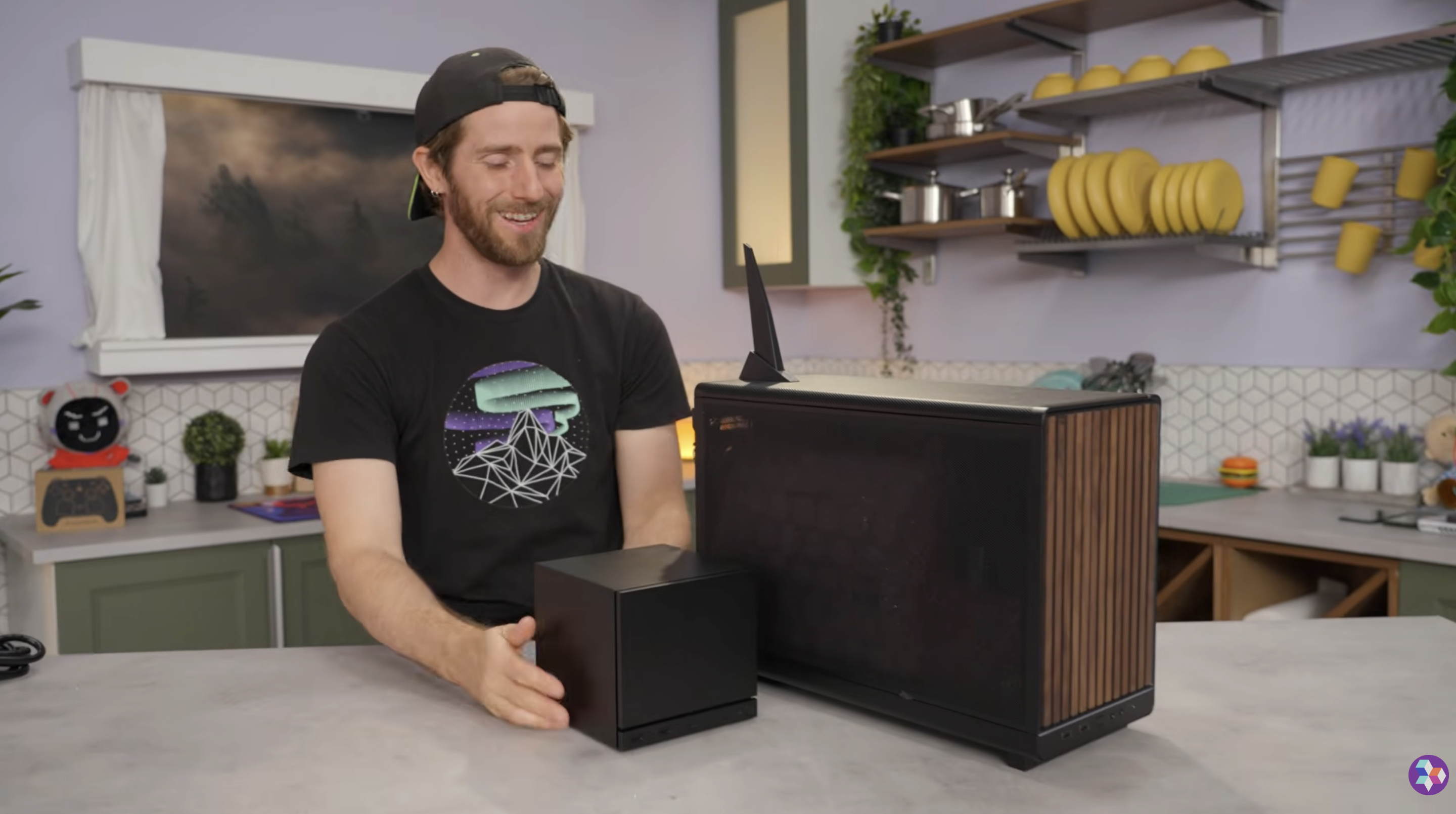
I almost bought this instead, when I found out that I was on the waitlist. It's a prebuilt that has SteamOS preinstalled.

I'm so glad I ended up with a Steam Machine, instead. Granted, I'm sure people will get enjoyment out of this "Steamroller" and it does look nice (and would probably pass the wife test), but wow...I didn't realize how much bigger it would be than the Steam Machine! The size difference is pretty nuts.

Linus also couldn't get the Steam Controller to work during installation and had to connect it via USB (possible user error or an edge case). It also doesn't boot up as quickly as SM, but still not bad. He noticed some noise coming from the box and I'm assuming it'll produce more heat.

$1,300 for better performance, of course, but yeah...still can't beat the form factor, Steam Controller receiver, HDMI-CEC, and sleep/wake from the controller with Steam Machine. When you see it next to another "small PC", it really shows how impressive the design and engineering is on this thing.

I do hope we see more pre-builts with SteamOS installed and I hope there's a way for them to get sleep/wake via controller to eventually work from the hardware side of things. It really is a game changer in this space.

1jyP80dmuodB34ze.png


Also, the Steam Machine doesn't have a Wi-Fi shark fin 🦈
 
Last edited:


I almost bought this instead, when I found out that I was on the waitlist. It's a prebuilt that has SteamOS preinstalled.

I'm so glad I ended up with a Steam Machine, instead. Granted, I'm sure people will get enjoyment out of this "Steamroller" and it does look nice (and would probably pass the wife test), but wow...I didn't realize how much bigger it would be than the Steam Machine! The size difference is pretty nuts.

Linus also couldn't get the Steam Controller to work during installation and had to connect it via USB (possible user error or an edge case). It also doesn't boot up as quickly as SM, but still not bad. He noticed some noise coming from the box and I'm assuming it'll produce more heat.

$1,300 for better performance, of course, but yeah...still can't beat the form factor, Steam Controller receiver, HDMI-CEC, and sleep/wake from the controller with Steam Machine. When you see it next to another "small PC", it really shows how impressive the design and engineering is on this thing.

I do hope we see more pre-builts with SteamOS installed and I hope there's a way for them to get sleep/wake via controller to eventually work from the hardware side of things. It really is a game changer in this space.

What still gets me is the Steam Machines 300W power supply, and that it only delivers about 195W under full load. That Steamroller uses a 650W power supply. Assuming you game 20/hours a week on either device, and given the national average cost in electricity, that's an extra $78.33 per year just in electricity for gaming on the Steamroller. If you're somewhere expensive like California that number could reach as high as an extra $145.
 
Last edited:
What still gets me is the Steam Machines 300W power supply, and that it only delivers about 195W under full load. That Steamroller uses a 650W power supply. Assuming you game 20/hours a week on either device, and given the national average cost in electricity, that's an extra $78.33 per year just in electricity for gaming on the Steamroller. If you're somewhere expensive like California that number could reach be as high as an extra $145.
Wow! That's like 5+ Steam Summer Sale games a year lol

That's quite impressive. Now I can tell my wife that it'll pay for itself from the energy savings when I'm not using my 4090 rig :messenger_grinning_sweat: (she doesn't need to know that I'll be streaming from it sometimes and it'll more than cancel it out...shhh)


I almost bought this instead, when I found out that I was on the waitlist. It's a prebuilt that has SteamOS preinstalled.

I'm so glad I ended up with a Steam Machine, instead. Granted, I'm sure people will get enjoyment out of this "Steamroller" and it does look nice (and would probably pass the wife test), but wow...I didn't realize how much bigger it would be than the Steam Machine! The size difference is pretty nuts.

Linus also couldn't get the Steam Controller to work during installation and had to connect it via USB (possible user error or an edge case). It also doesn't boot up as quickly as SM, but still not bad. He noticed some noise coming from the box and I'm assuming it'll produce more heat.

$1,300 for better performance, of course, but yeah...still can't beat the form factor, Steam Controller receiver, HDMI-CEC, and sleep/wake from the controller with Steam Machine. When you see it next to another "small PC", it really shows how impressive the design and engineering is on this thing.

I do hope we see more pre-builts with SteamOS installed and I hope there's a way for them to get sleep/wake via controller to eventually work from the hardware side of things. It really is a game changer in this space.

1jyP80dmuodB34ze.png


Also, the Steam Machine doesn't have a Wi-Fi shark fin 🦈


I have the same case. Calling anything built in it a Steam Machine is a huge leap. It's just a slightly smaller PC. Fantastic case, but it's no Steam Machine with all that that implies.
 
I have the same case. Calling anything built in it a Steam Machine is a huge leap. It's just a slightly smaller PC. Fantastic case, but it's no Steam Machine with all that that implies.
It really is a nice case. I still would've been happy with something like that and would've made it work, but yeah it's just not the same. Even with SteamOS preinstalled.
 
It really is a nice case. I still would've been happy with something like that and would've made it work, but yeah it's just not the same. Even with SteamOS preinstalled.
I know they priced that build in the Linus video near the Steam Machine, but that case could fit a AMD 9060xt or 9070xt GPU in it. The 9070xt might need 750w, but 650w would be enough for a 9060xt.

Smaller cases could still fit the hardware they picked, and if they're gonna go as big as that...might as well get a GPU with 16gb of vram, and get a machine that could do 1440p (9060xt) or 4k (9070xt).
 
Last edited:
Got EmuDeck set up and running on the Machine, works fantastically. PS2 games running at 10x internal resolution, the GPU is only getting taxed like 40%. Gonna load up some PS3 / Xbox 360 era games and see how they do.
 
Got EmuDeck set up and running on the Machine, works fantastically. PS2 games running at 10x internal resolution, the GPU is only getting taxed like 40%. Gonna load up some PS3 / Xbox 360 era games and see how they do.
Oh man, that is fantastic news!

PS2 would be my maximum emulation bar, so it sounds like I'd be set 🔥

I need to bump this up my priority list. My 2TB NVMe comes in next week, so that upgrade will be a good catalyst to set up emulators. Tons of bucket list games from that front.
 
Oh man, that is fantastic news!

PS2 would be my maximum emulation bar, so it sounds like I'd be set 🔥

I need to bump this up my priority list. My 2TB NVMe comes in next week, so that upgrade will be a good catalyst to set up emulators. Tons of bucket list games from that front.
Just FYI to you & jshackles jshackles
You can also with emudeck use their migration tool to move your entire emulator setup on to a micro-sd card and back. That way you can offload to cheaper storage if you need more space for PC games, and migrate back to main storage for PS3/Switch games that benefit from SSD speeds. Also what I do, is just take that micro-sd card to bring your whole setup to a Steam Deck (or other handheld) to bring with you on the go since it has your save files.


The emudecky plugin is nice for updating emulators while you're in game mode instead of going to desktop.


The GyroDSU that's part of that plugin to get gyro working with WiiU/Switch emulators only works for Steam Deck now, but developer seems to show interest in getting to work with Steam Controller. Some person did make a project to do this already though, but haven't tried:

 
Just FYI to you & jshackles jshackles
You can also with emudeck use their migration tool to move your entire emulator setup on to a micro-sd card and back. That way you can offload to cheaper storage if you need more space for PC games, and migrate back to main storage for PS3/Switch games that benefit from SSD speeds. Also what I do, is just take that micro-sd card to bring your whole setup to a Steam Deck (or other handheld) to bring with you on the go since it has your save files.


The emudecky plugin is nice for updating emulators while you're in game mode instead of going to desktop.


The GyroDSU that's part of that plugin to get gyro working with WiiU/Switch emulators only works for Steam Deck now, but developer seems to show interest in getting to work with Steam Controller. Some person did make a project to do this already though, but haven't tried:


Absolutely beautiful. Thank you!!
 
I think I'm out. I'm gonna leave my reservation open in case I change my mind but I don't think I care much anymore.
giphy.gif


Leave that reservation, for sure. Totally understandable to feel that way. You never know when it'll hit and maybe you'll feel better about it that day. Sorry it's not panning out, bro.

I had to take a risk and spend more to get this thing. Zero regrets and don't recommend, but I know deep down you'll get joy out of it. I'd be feeling the exact same way. I was so crushed to be put on the waitlist.

Reframe it and think of it as a nice surprise at this point when that email comes in and see how you're feeling then. I know I'm still looking out for one for you. Maybe another will pop up here on GAF soon.

We can all say that the purchasing experience for this is complete bullshit :)
 
giphy.gif


Leave that reservation, for sure. Totally understandable to feel that way. You never know when it'll hit and maybe you'll feel better about it that day. Sorry it's not panning out, bro.

I had to take a risk and spend more to get this thing. Zero regrets and don't recommend, but I know deep down you'll get joy out of it. I'd be feeling the exact same way. I was so crushed to be put on the waitlist.

Reframe it and think of it as a nice surprise at this point when that email comes in and see how you're feeling then. I know I'm still looking out for one for you. Maybe another will pop up here on GAF soon.

We can all say that the purchasing experience for this is complete bullshit :)
Yeah, I'm gonna leave it for now and make the final decision when my turn is up but I'm just not feeling it as much now for multiple reasons
  • Part of it is definitely because I'm sick of waiting.
  • Valve has definitely fucked up the entire process IMO. The randomization is already dumb, but now we've got waitlist people receiving their emails and consoles before reservation queue despite being the same model (512, 2TB, etc) and same regions (East coast US and even same states). No offense to the people on the waitlist but there is absolutely no valid reason why anybody in the waitlist should be receiving their devices before reservation queue.
  • Price. I have the money to spend and I want to get away from Windows but should I spend $1250 after tax in order to do it when I have a perfectly working PC already in my living room (my desk is in our living room as my girlfriend works from home + has an art business so uses our extra bedroom)
 
Yeah, I'm gonna leave it for now and make the final decision when my turn is up but I'm just not feeling it as much now for multiple reasons
  • Part of it is definitely because I'm sick of waiting.
  • Valve has definitely fucked up the entire process IMO. The randomization is already dumb, but now we've got waitlist people receiving their emails and consoles before reservation queue despite being the same model (512, 2TB, etc) and same regions (East coast US and even same states). No offense to the people on the waitlist but there is absolutely no valid reason why anybody in the waitlist should be receiving their devices before reservation queue.
  • Price. I have the money to spend and I want to get away from Windows but should I spend $1250 after tax in order to do it when I have a perfectly working PC already in my living room (my desk is in our living room as my girlfriend works from home + has an art business so uses our extra bedroom)
Man, all of that is totally understandable. We'll all still be here if your number comes up and decide to get one :)
 
I've got a spare 4TB external SSD, trying to decide if I want to use it to store games or store ROMs for emulation.
 
Yeah, I'm gonna leave it for now and make the final decision when my turn is up but I'm just not feeling it as much now for multiple reasons
  • Part of it is definitely because I'm sick of waiting.
  • Valve has definitely fucked up the entire process IMO. The randomization is already dumb, but now we've got waitlist people receiving their emails and consoles before reservation queue despite being the same model (512, 2TB, etc) and same regions (East coast US and even same states). No offense to the people on the waitlist but there is absolutely no valid reason why anybody in the waitlist should be receiving their devices before reservation queue.
  • Price. I have the money to spend and I want to get away from Windows but should I spend $1250 after tax in order to do it when I have a perfectly working PC already in my living room (my desk is in our living room as my girlfriend works from home + has an art business so uses our extra bedroom)
Really, wait list people are receiving emails? 😐
 
Oh man, that is fantastic news!

PS2 would be my maximum emulation bar, so it sounds like I'd be set 🔥

I need to bump this up my priority list. My 2TB NVMe comes in next week, so that upgrade will be a good catalyst to set up emulators. Tons of bucket list games from that front.
CPU is the big limiter for emulation and Zen 4/5 are beasts for it. You should have no issues doing PS3, 360, Wii-U, Switch. PS4 will more than likely also end up being fine, while most Xbox One games already have PC versions.
 
You really can't make this shit up lol

I just received my email at 8:26pm... I'm gonna have to sit on it a bit.

Really, wait list people are receiving emails? 😐
I've been lurking the SM subreddit when bored at work and there have been multiple posts where people on waitlist got their emails. Most people seem to have posted their location and SKU to keep people up to date and there were multiple East Cost US and 512 w/ controller posts (my location).
 
You really can't make this shit up lol

I just received my email at 8:26pm... I'm gonna have to sit on it a bit.

Damn look at that timing.
I've been lurking the SM subreddit when bored at work and there have been multiple posts where people on waitlist got their emails. Most people seem to have posted their location and SKU to keep people up to date and there were multiple East Cost US and 512 w/ controller posts (my location).
Strange!
 
Damn look at that timing.

Strange!
Gabe must have my MacBook bugged or something. "Woah this guy isn't funding my yacht I gotta send that email" lol

On the waitlist front. People could fake it I guess especially since most of the posts are the same email and emails have gone out in batches but the consensus was that when people cancel it pulls somebody from waitlist up I guess.
 
You really can't make this shit up lol

I just received my email at 8:26pm... I'm gonna have to sit on it a bit.


I've been lurking the SM subreddit when bored at work and there have been multiple posts where people on waitlist got their emails. Most people seem to have posted their location and SKU to keep people up to date and there were multiple East Cost US and 512 w/ controller posts (my location).
giphy.gif


Buy now. Decide later.

You can return it or sell it later, but that's not as fun. Happy for you!
 
I went ahead and ordered it. I forgot that one of my good work friends is on the waitlist for the same model and I essentially have a guaranteed sale on top of the return policy.
Yeah, and there's always ebay. Last I checked they were fetching a premium so you could always get out without any trouble it seems like.

Gabe must have my MacBook bugged or something. "Woah this guy isn't funding my yacht I gotta send that email" lol

On the waitlist front. People could fake it I guess especially since most of the posts are the same email and emails have gone out in batches but the consensus was that when people cancel it pulls somebody from waitlist up I guess.
That's lame if true. It should go to someone else on the reservation queue.
 
Top Bottom