
• Hey Guest. Check out your NeoGAF Wrapped 2025 results here!

Hori FPS Pad Plus for PS4/PS3 review.

Coda

Member
hori-pad-fps-plus-for-playstation-4-415687.2.jpg


Review:

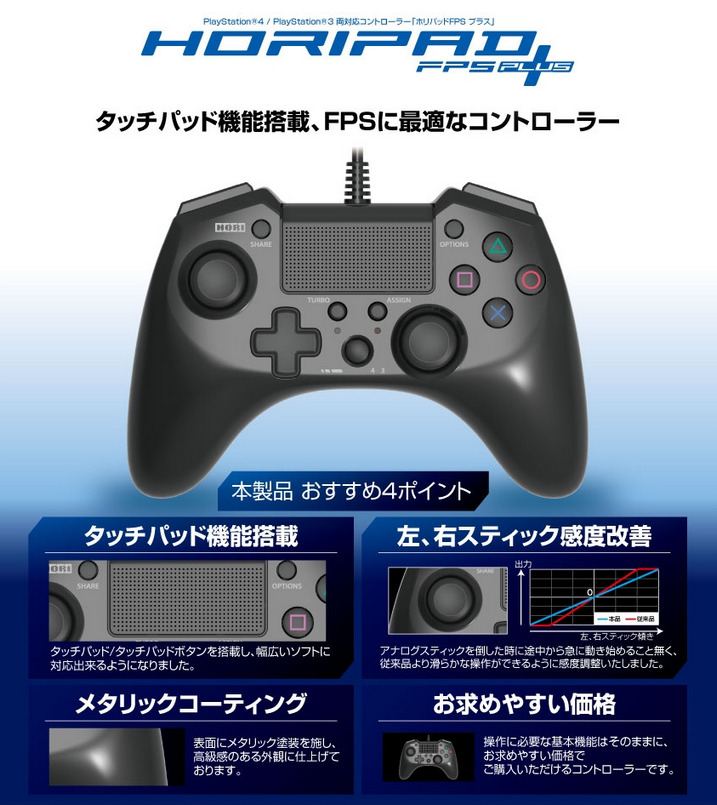
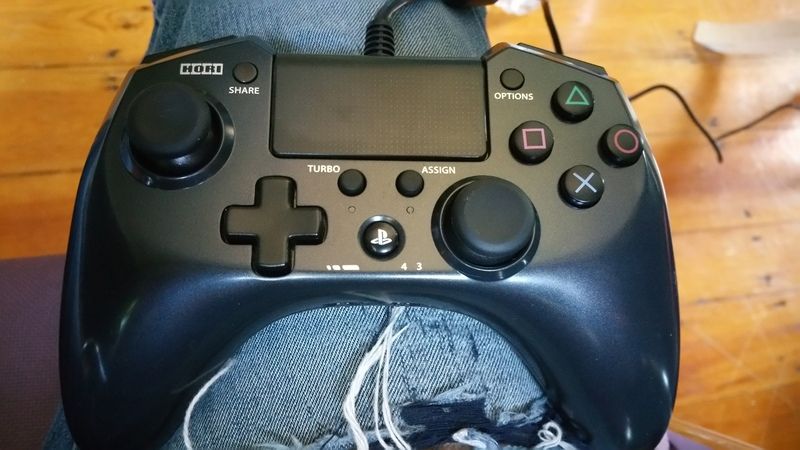
I have to say this gamepad exceeded my expectations so I felt that NeoGAF needed to know. First of all for all your Xbox 360 gamepad lovers this feels very similar to that gamepad but definitely even better. Almost feels like if the 360 controller and Wii U Pro had a baby. It just has a nice feel in your hands, much better than the DS4 in my opinion. The analog sticks have a nice feel to them, maybe slightly looser than the DS4. You have a switch towards the bottom side which switches between three analog stick sensitivity levels and another switch to the right of that one for either playing on a PS4 or PS3. I have only tested playing this pad on the PS4. D-Pad also has a nice feel to it and is more in the Nintendo style, which I personally prefer.

I did not test the Turbo or Assign features thoroughly but I quickly tested them and they function as they should. The main draw of this game pad though is the fact that it is wired and has a "Target" button tucked away to the left on the backside of the controller. I never thought this button would be a big deal but for shooters it's such a huge deal. When you press and hold that button when aiming it tightens the sensitivity so you can easily track an enemy when they're running away or strafing. It makes target acquisition much more stress free and accurate. I also love the triggers on this thing. They're big square like buttons that are impossible to miss. I always felt like the angle of the DS4 made pushing the triggers feel weird and I felt that my fingers would always be weirdly slipping off or not able to react in time.

So to sum it up if you are a serious FPS player or even action game fan I think this controller has a great feel and it's build quality is very nice and I can tell it will last me a very long time. I highly recommend it.

Places to buy:
http://www.play-asia.com/hori-pad-fps-plus-for-playstation-4/13/708wqv

http://www.nin-nin-game.com/en/japanese-import-playstation-3-accessories/15293-horipad-4-fps-blue-version-ps3ps4-brand-new-en-4961818023673.html

http://www.amiami.com/top/detail/detail?scode=GAME-0014453

Additional pictures:
20150716_144118_zpsimrxccza.jpg


20150716_144151_zps1r3xpdym.jpg


20150716_144204_zpsz8tqoea5.jpg
 
I've bought a couple of third party controllers in the past but they all had some sort of really bad thing about them and most of them had deadzone.

Is there any amount of deadzone on this controller in fps's lif BF4/Hardline/COD?

Even the tiniest amount fucks me up. DS4 is SUPERB in this aspect
 
I've bought a couple of third party controllers in the past but they all had some sort of really bad thing about them and most of them had deadzone.

Is there any amount of deadzone on this controller in fps's lif BF4/Hardline/COD?

Even the tiniest amount fucks me up. DS4 is SUPERB in this aspect

I've always had trouble knowing if a controller has deadzone or not, is there any good way of testing it? The only FPS I played with the controller was BF Hardline and it felt great. I'd assume since it's designed for FPS that it has no deadzone but I'm not entirely sure on how to test it. I think easily the best feature of this controller is the "Target" button though by a mile.
 
Looks good! Where'd you order from? I wonder if it's common ground for pad hacking.

edit: i see you listed places to order in OP, is there a preferred one amongst those?
 
Unfortunately there isn't. That's probably a big problem for a lot of people.

Oh that's really major oversight for me.

What are the dead zones on the sticks like? 3rd party controllers are normally worse than official and the Dualshock 4s are just impeccable, the best I've ever come across(for the games that actually implement it)
 
Unfortunately there isn't. That's probably a big problem for a lot of people.

I use a Astro MixAmp with my headset so it's not an issue for me.

350x700px-LL-cf993daa_5523725230_d0ba8c8383.jpeg

How does this connect to the TV? Been looking for a better way to use my headphones with my TV besides the Dualshock 4's rather meh audio output.
 
My god those Shoulder and Trigger buttons look like shit!

Couldn't be anymore shit than the triggers on the official controller. From the pics, these look at least like they're a shorter throw.

Being wired and not having a headphone jack makes this an instant pass for me though. Appreciate the review though. I wish I could get a DS4 with 360 sticks.
How does this connect to the TV? Been looking for a better way to use my headphones with my TV besides the Dualshock 4's rather meh audio output.

It doesn't. It connects to whatever device you're using via optical.
 
Looks good! Where'd you order from? I wonder if it's common ground for pad hacking.

edit: i see you listed places to order in OP, is there a preferred one amongst those?

I've ordered stuff from all three of those sites before so I'm sure anyone you pick would be good but I personally ordered mine from Nin-Nin-Game.
 
Shame its not wireless it seems, its cheaper than a DS4 so it could serve as a nice 2nd controller. On the upside, It has no light to speak of
 
How does this connect to the TV? Been looking for a better way to use my headphones with my TV besides the Dualshock 4's rather meh audio output.

It connects to your PS4 via USB (which powers it) and then you plug in an optical audio cable into it and into the back of the PS4. Audio sounds great through it.
 
It looks a lot like the Wii U Pro controller. My DS4 is dying (sticks already peeled and replaced them with those XBO clones, but buttons get stuck all tbe time too...). Maybe I'll give this a try insted of just buying another DS4.
 
I think the shoulder buttons are getting a bad rap. They are in my opinion some of the most comfortable triggers and I feel like you just need to have the controller in your hands to feel it. The way the controller is ergonomically designed is why they feel right. Can't really explain it better than saying that. I also have fairly bigger hands so it fits my hand well, I'd always get hand cramps after like an hour of play with the DS4.
 
Couldn't be anymore shit than the triggers on the official controller. From the pics, these look at least like they're a shorter throw.

Being wired and not having a headphone jack makes this an instant pass for me though. Appreciate the review though. I wish I could get a DS4 with 360 sticks.


It doesn't. It connects to whatever device you're using via optical.

And yes these definitely have a shorter throw which I like, I fire my gun and can react faster with these triggers. They also have a nice kind of subtle pressure/resistance to them when pressed.
 
your jeans have a hole in them. should get that patched lol jk

any chance you can make a brief yt video to give us an idea of the build quality? :)

kind of scared to try this out because of the awful reviews the previous iteration of this pad got (the one with no touchpad).
 
Why would anyone use an asymmetrical controller to replace a symmetrical one? This makes no sense, the hands are naturally symmetrical.

EDIT: That came off the wrong way, nothing against anyone that wants an asymmetrical controller.
 
Didn't see a mention of native support anywhere, so you'd need to download ds4windows or something similar.

I figured that much, but would this controller even be detected at all if connected to a PC? Again, probably a silly question considering it's connected via USB but you never know.
 
And yes these definitely have a shorter throw which I like, I fire my gun and can react faster with these triggers. They also have a nice kind of subtle pressure/resistance to them when pressed.

That sounds appealing. I love that the new Elite controller on Xbox One/PC has a setting that cuts the throw in half. The throw distance on the dual shock 4 is stupidly long imo.

Why would anyone use an asymmetrical controller to replace a symmetrical one? This makes no sense, the hands are naturally symmetrical.

EDIT: That came off the wrong way, nothing against anyone that wants an asymmetrical controller.

Your hands are symmetrical, but unless you're actually playing games that only always use just the sticks, your hands are rarely if ever placed symmetrically on the controller. It's a terrible argument against asymmetrical stick placement.
 
I figured that much, but would this controller even be detected at all if connected to a PC? Again, probably a silly question considering it's connected via USB but you never know.

Yes, it's detected. But since Windows lacks drivers for it (unlike for Xbox controllers) you need to install extra software like ds4windows to use the controller.
 
Yes, it's detected. But since Windows lacks drivers for it (unlike for Xbox controllers) you need to install extra software like ds4windows to use the controller.

Perfect, thanks! Might just consider purchasing this controller in the near future since I really don't care for the Dualshock's build quality and heard bad things about the D-pad present in the recent Xbox One controller revision.
 
Yes, it's detected. But since Windows lacks drivers for it (unlike for Xbox controllers) you need to install extra software like ds4windows to use the controller.

I would think this controller would work as a Dualshock 4 would when connected (I.E. DirectInput support, but no Xinput), is that not the case? Obviously the controller itself would have to be toggled to PS4.
 
Why would anyone use an asymmetrical controller to replace a symmetrical one? This makes no sense, the hands are naturally symmetrical.

EDIT: That came off the wrong way, nothing against anyone that wants an asymmetrical controller.

this is for the people who are used to/prefer xbox controllers. also concave thumbsticks
 
I like how L2/R2 are PS2 style, but they look horribly unconfortable.
And that isn't wireless...

Truth to be told, I love the Dualshock 1/2

Like I said, the way the controller is designed the triggers are actually extremely comfortable. Something you unfortunately just need to feel than see.
 
I've always had trouble knowing if a controller has deadzone or not, is there any good way of testing it? The only FPS I played with the controller was BF Hardline and it felt great. I'd assume since it's designed for FPS that it has no deadzone but I'm not entirely sure on how to test it. I think easily the best feature of this controller is the "Target" button though by a mile.

You can go in to hardline and see if you can move the right stick without anything happening on screen
 
Top Bottom