

yamaci
Member
who overrides the quality level aside from setting custom resolution percentages though?That automatic selector sounds quite tucking awesome.
I will have to try it when return home, but I really don't have M and L presets in app, lol.

who overrides the quality level aside from setting custom resolution percentages though?That automatic selector sounds quite tucking awesome.
I will have to try it when return home, but I really don't have M and L presets in app, lol.


Do not use "latest" in nvidia app anymore. You have to select depending on what quality you expect to run the games.
OR
DLSS swapper can do this. The Nvidia app sortof can as well.It would be cool and less confusing if there was an easy way to check in-game which DLSS is running to avoid confusion in general


Im getting confused now. Is K going to be updated to 4.5 as well then or 4.5 will remain just with M and L?
It would be cool and less confusing if there was an easy way to check in-game which DLSS is running to avoid confusion in general
sharpening is that not that noticeable in expedition and alan wake for meSo 4.5 currently only have 2 presets for performance and ultra performance. Why tho? I want the benefit of the less ghosting but without that awful sharpening

I tried 3 games, all 3 looked awful with itsharpening is that not that noticeable in expedition and alan wake for me
i think horizon comparisons were a bit unfair as that game already has a weird sharpening behavior when using upscalers that you cannot disable.

The only game I tried so far. Preset M in performance mode with 4k output resolution. My subjective impression is that it is indeed very crisp. I turned off the sharpening filter completely and it is still super sharp. But yeah, looking forward to more in-depth comparisons.Don't really see a difference with E33
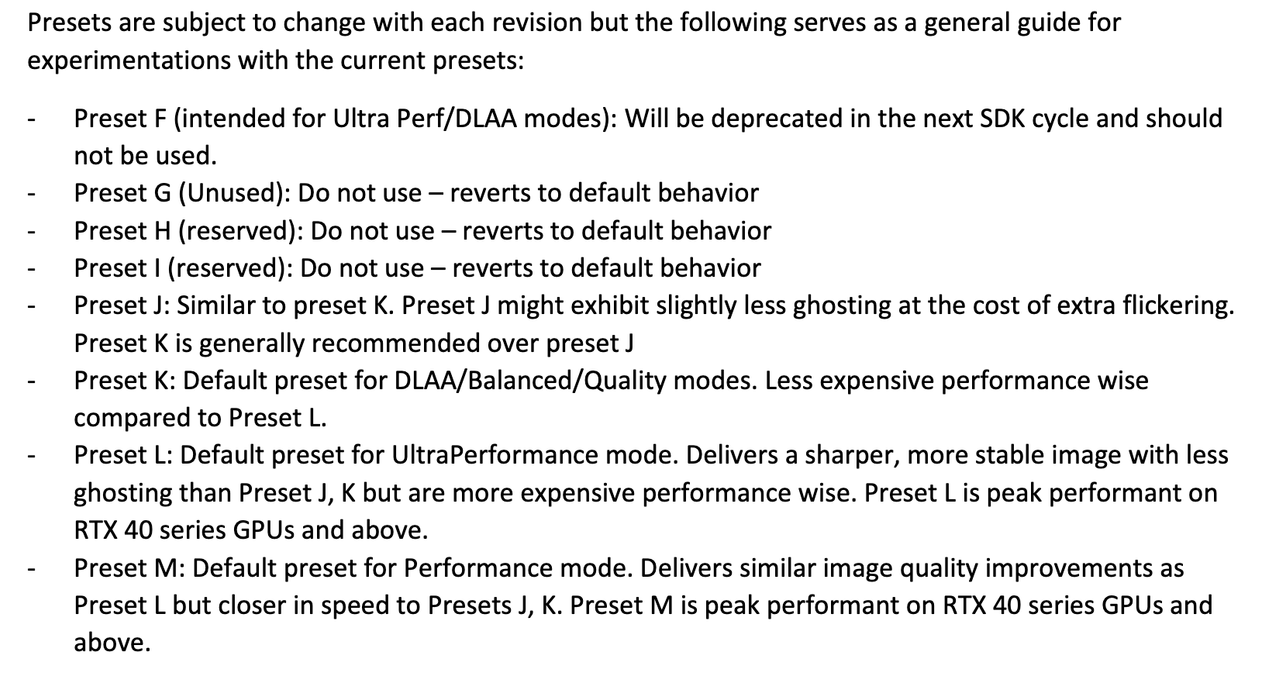
C, D, E = dlss3
J, K = dlss4
L, M = dlss4.5
Dlss swapper had option to show info about dlss in game.

You can check through the nvidia overlay (alt+z for me), just go to statistics and itll be right there once you select custom info, press show more and scroll all the way down.It would be cool and less confusing if there was an easy way to check in-game which DLSS is running to avoid confusion in general

You can check through the nvidia overlay (alt+z for me), just go to statistics and itll be right there once you select custom info, press show more and scroll all the way down.

And how is the internet now?The bubble is not about the quality and usefulness of AI, but rather the investments into companies purporting to leverage AI but are nothing burgers. The DOT COM bust didn't happen because the Internet was a bad idea, but companies being overleveraged while promising the world. Looking into the financials of the various layers of AI companies today, something smells. A lot of borrowing from Peter to pay Paul.

Yeah sorry about that, it has since been clarified that L is just for ultra performance mode and M is for all - which was the original understanding this morning but some incorrect information was bubbling to the top about it by midday which has since been invalidated.So the other post was bs about M only being for performance.

| DLSS Mode | Default AI Preset | Version | Key Characteristics |
| Quality | Preset K | 4.0 | Standard high-quality model; provides excellent image stability. |
| Balanced | Preset K | 4.0 | Shares the Quality model to maintain fine detail at medium scaling. |
| Performance | Preset M | 4.5 | New for 4.5: Optimized for speed while matching the quality of newer architectures. |
| Ultra-Performance | Preset L | 4.5 | New for 4.5: Delivers the sharpest, most stable image with the least ghosting. |
| DLAA | Preset K | 4.0 | Uses the high-stability model for native-resolution anti-aliasing. |

I feel you didn't understand my post.And how is the internet now?
It's still here, much more widespread and full of fees, subscriptions and ads.
If you are comparing AI to the Dot-com bubble, do the full picture. All of the tech bubble bursts (social media, rail road, mobile apps, renewable energy, etc.) came back much more widespread, so if you hate AI now, something that is in high demand, just imagine how bad it will be after the AI bubble bursts when a few companies monopolize in industry.
Wishing for a AI bubble burst that would fuck us up even more is so stupid.


I was testing with this during the afternoon quite a bit and got pretty confused why it was not working in Indana Jones, DOOM DA or SW OutlawsYou can check through the nvidia overlay (alt+z for me), just go to statistics and itll be right there once you select custom info, press show more and scroll all the way down.

I dont think it was ever said that preset M can only be used for performance mode just that it was clear that performance mode was the best thing to match it with. From everything ive read it seems Performance (M) is superior in image quality to Quality/Balanced (Preset K) So using (M) with Quality/Balanced/DLAA seems to be a waste of performance.So the other post was bs about M only being for performance. Its recommend for all quality modes, assuming you're ok with the 10 fps hit or so. For a sec I thought K was also getting updated and would remain for quality/balanced/dlaa, m perf, l ultraperf, but I guess its clear now.


DLSS is getting so good that maybe a 3060 with 12 gig VRAM is actually viable in 2026 at 1440p
Nvidia's terminology for this couldn't be more confusingC, D, E = dlss3
J, K = dlss4
L, M = dlss4.5
I dont think it was ever said that preset M can only be used for performance mode just that it was clear that performance mode was the best thing to match it with. From everything ive read it seems Performance (M) is superior in image quality to Quality/Balanced (Preset K) So using (M) with Quality/Balanced/DLAA seems to be a waste of performance.
Also this image shows that performance mode has the least % loss (Avatar 5060 Ti 1440p)

DLSS is getting so good that maybe a 3060 with 12 gig VRAM is actually viable in 2026 at 1440p
I just upgraded from a 3080. You are insane to think thats viable unless an unstable 60 is your happy place. Which means you should just be playing on a console.


So basically you get better visuals and same performance or a small boost if you go from Quality to Balanced or Performance.I dont think it was ever said that preset M can only be used for performance mode just that it was clear that performance mode was the best thing to match it with. From everything ive read it seems Performance (M) is superior in image quality to Quality/Balanced (Preset K) So using (M) with Quality/Balanced/DLAA seems to be a waste of performance.
Also this image shows that performance mode has the least % loss (Avatar 5060 Ti 1440p)
So much for "complete support of every RTX card"
If you have 20 or 30 Series you have to drop DLSS to Perfomance mode instead of DLAA or Quality mode to avoid the performance penalty, basically negating the advantages of DLSS 4.5
But great marketing scam NVIDIA
This way they won't get the backlash that AMD got with FSR4 RDNA 2/3 support

So the other post was bs about M only being for performance. Its recommend for all quality modes, assuming you're ok with the 10 fps hit or so. For a sec I thought K was also getting updated and would remain for quality/balanced/dlaa, m perf, l ultraperf, but I guess its clear now.
IDK if thats right, but it makes sense based on what the on-screen indicators report when using it say. They did upgrade RR dll too tho, but god knows what that actually entails and if the changes include the antialiasing(upscaling) model and how the logic there works.I was testing with this during the afternoon quite a bit and got pretty confused why it was not working in Indana Jones, DOOM DA or SW Outlaws
Well as it turns out if you have Ray Reconstruction enabled it will replace the basic DLSS and I couldn't test the new stuff. Not sure though if this is intended or not that they can't work together.


Well that settles it for me - DLSS4.5 (v310.5.0 preset L) is leaps and bounds more temporally stable compared to the first gen transformer model (v310.4.0 preset K). Booted up Jedi: Survivor where the issue was especially egregious in the Fogged Expanse (light-saber trail leaves artifacts that almost looks like horrible gray-banding and/or low-resolution fog volumes) and it's been all but eliminated.
Looking incredibly promising so far, and the boost to visual fidelity means I might finally bump things down from Quality for Performance to offset some of the potential performance loss. Gonna give Ghost of Tsushima try later after work since the issues with the transformer model were immediately obvious on the title screen with wind trails and pampas grass leaving artifacts.
Looks like 4.5 balanced is the same fps as 4.0 quality and its not that oversharpened as 4.5 quality, so if i want to use 4.5 at 1440p, i should use balanced instead of quality here
IDK if thats right, but it makes sense based on what the on-screen indicators report when using it say. They did upgrade RR dll too tho, but god knows what that actually entails.
(btw if you use DLSS swapper to change the files it wont show up in the nvidia overlay too since theres nothing to override, but thats obvious)
I did try it out in Expedition 33 while keeping RR on 4.5 version and only changing fg+upscaling, couldnt really find a difference in image quality.
Then i did try it out in Doom Dark Ages (i dont use RR there) and Anno 117, there i could tell a difference with M override working, so i think youre right and RR does indeed invalidates upscaling, but not framegen.


Quick comparison I did with Avatar. Ray Reconstruction has to be off right now with DLSS 4.5, as the RR dll hasn't been updated to 4.5 yet. So ignore the water differences as that's where RR kicks in.
Outside of that, DLSS 4.5 is definitely noticeably clearer and a marked improvement over DLSS 4.0.

Nvidia's terminology for this couldn't be more confusing
C,D,E = CNN
J,K = Transformer v1 (FP16)
L,M = Transformer v2 (FP8)
RTX 20 and 30 have relatively poor FP8 performance and should stick with CNN or Transformer v1
RTX 40 and 50 have good FP8 performance and should use Transformer v2
Need these two posts in the OP. (Assuming they are correct)Yea the info circulating seemed to be wrong, M is for all quality settings except ultra performance.
Which GPU are you on? Typical, I've just recently honed in on my preferred optimised settings for this game just as they updated the RR, which have enabled. But I dread to think what the performance hit will be after they update 4.5 to work with it. I think I'll probably end up staying with the already excellent 4.0 in that game especially.


AI has good applications. I like it for translations.can't wait to try it out.
i get all the AI hate but i like DLSS. people just want to hate on anything with AI in it.
it used to suck but you can easily get away playing at performance level now and the frame gen doesn't look or feel any different from frames being rendered.
they might be fake frames but i'll take them.

So much for "complete support of every RTX card"
If you have 20 or 30 Series you have to drop DLSS to Perfomance mode instead of DLAA or Quality mode to avoid the performance penalty, basically negating the advantages of DLSS 4.5
But great marketing scam NVIDIA
This way they won't get the backlash that AMD got with FSR4 RDNA 2/3 support
GeForce Head of Global PR

RTX 3060
lmao. Just give me the same image quality and sharpness as DLSS4 right now at 1440p quality, but without the ghosting. Im gonna avoid this for now, because K model looks much better to me minus the ghosting ofc as far as image quality and motion clarity goesAnd here's another Nvidia employee disagreeing with the above Nvidia employee:
Gotta love when Nvidia themselves don't even agree on the best way to use their tech
Both new driver and beta nvidia appQuick question: does the new driver need to be installed for this to work?
