• Hey Guest. Check out your NeoGAF Wrapped 2025 results here!

Lifelong consoleplayer needs help with buying a PC.

To each to their own, I find there's a lot of friction points with that, you have to flip over to a wireless mouse and keyboard often to do basic things in Windows.

Imagine you're coming from a console, where you can wake the system up with a controller, and it boots directly into the console UI. And now you have to fiddle with things on PC every time you want to play a game.. it seems small, but it's death by a thousand cuts for daily use.

SteamOS is going to replicate console like use case much better than Windows can currently. I think windows works best with a computer monitor at a desk currently.

the-rock-eyeroll.gif


You can use Steam Big Picture mode, Xbox Full Screen Experience, controllers analog sticks and/or track pads too, etc etc...
 
To each to their own, I find there's a lot of friction points with that, you have to flip over to a wireless mouse and keyboard often to do basic things in Windows.

Imagine you're coming from a console, where you can wake the system up with a controller, and it boots directly into the console UI. And now you have to fiddle with things on PC every time you want to play a game.. it seems small, but it's death by a thousand cuts for daily use.

SteamOS is going to replicate console like use case much better than Windows can currently. I think windows works best with a computer monitor at a desk currently.

I don't know if you have actually used SteamOS but PC games can be fiddly no matter what operating system. It's even worse when you actually need to fiddle with something beneath the console like UI. I swear the file system for games using Proton is a clusterfuck.
 
To each to their own, I find there's a lot of friction points with that, you have to flip over to a wireless mouse and keyboard often to do basic things in Windows.

Imagine you're coming from a console, where you can wake the system up with a controller, and it boots directly into the console UI. And now you have to fiddle with things on PC every time you want to play a game.. it seems small, but it's death by a thousand cuts for daily use.

SteamOS is going to replicate console like use case much better than Windows can currently. I think windows works best with a computer monitor at a desk currently.
I solved this by using a wireless keyboard with a built-in touchpad. I use the gamepad for storefronts and gaming, while the wireless keyboard handles adjusting RivaTuner profiles and using the Nvidia app. I think this is essential on a PC, though it's no big deal. It will only offer a truly console-like experience if we play PC games on dedicated hardware—like the Steam Machine (which is very entry-level) or the upcoming Xbox Helix, provided it supports Steam.
 
I solved this by using a wireless keyboard with a built-in touchpad. I use the gamepad for storefronts and gaming, while the wireless keyboard handles adjusting RivaTuner profiles and using the Nvidia app. I think this is essential on a PC, though it's no big deal. It will only offer a truly console-like experience if we play PC games on dedicated hardware—like the Steam Machine (which is very entry-level) or the upcoming Xbox Helix, provided it supports Steam.

71IEYcGW6jL._AC_SL1500_.jpg
 
I'll alleviate you of one of your fears off the bat. Prices will not come down. They will, at best, stabilize (and that's like a 3+ year out timeframe). You don't have to buy right now, but don't hold out hopes for a 50% price drop from a speculative market crash.

You've also really helped by providing an example of the types of games you want to play. VR gaming can be graphically demanding, but not necessarily so much as if you wanted to play games at the highest graphics fidelity.

My suggestion would be to go with a prebuilt, to reduce the complexity of your purchase. Then, as far as GPU cards go, you should probably aim for around the Nvidia 5070TI or AMD 9070XT. In any case, you'll want a GPU with the higher end of VRAM availability 12~16GBs+. The reason being that VR games tend to render a lot of textures very close up, constantly, meaning they tend to chew through the VRAM cache.
 
the-rock-eyeroll.gif


You can use Steam Big Picture mode, Xbox Full Screen Experience, controllers analog sticks and/or track pads too, etc etc...
"You can solve this by doing all this extra stuff"

That's exactly the friction I'm talking about.

Also steam big picture mode and Xbox full screen experience by default both react to the controller menu button, so you press it once, and both interfaces activate at the same time, conflicting with each other. It's really messy.

All of this is solvable, but it takes a lot of fiddling and configuration to get it to, at best, approximate a console like experience.

You're misleading people by understating these barriers, pc gaming on Windows 11 is not comparable to the console experience, especially for new users expecting to plug and play.
 
Last edited:
If you can, definitely build it yourself. It's really fun. You will a feel a sense of accomplishment when you build that first one yourself. Just pay attention to everything you're doing and read your motherboard manual. Ask questions on here if you have to.

Also, Steam Big Picture Mode will give you a console style experience on PC so you can hook it up to any big screen tv. The UI for Steam Big Picture Mode is excellent. You can also add games you bought on other stores (like GOG) to your Steam library as a non Steam game to make everything all in once place.

The best thing about PC gaming is the amount of things you can do with it. It will open whole new door in gaming for you. It has backwards compatibility for generations so you can dive into those old games you might have played on console, but now with 4k resolution and 120+fps. Those games are pretty much "Remasters".

You can also pretty much use any controller you want. If you plan on using a PS5 controller, I highly recommend making your own Dualsense wireless dongle. I made one recently and it has been excellent. It only cost me a little over $10 for the case and Raspberry Pi Pico 2W board. It gives you all the features of the Dualsense wirelessly on PC that are normally only functional via wired USB. You can read more about that here in this thread: https://www.neogaf.com/threads/redd...speaker-and-full-functionality-on-pc.1696533/
 
Unpopular opinion but u may want to consider a prebuilt pc too. It isnt the cheapest option, but you dont need to be as sophisticated in the technical aspects, everything will ideally work out of the box, and it will save you a lot of time. Building your own pc is ideal for many reasons, but not always the best fit for everyone
 
I'll alleviate you of one of your fears off the bat. Prices will not come down. They will, at best, stabilize (and that's like a 3+ year out timeframe). You don't have to buy right now, but don't hold out hopes for a 50% price drop from a speculative market crash.

You've also really helped by providing an example of the types of games you want to play. VR gaming can be graphically demanding, but not necessarily so much as if you wanted to play games at the highest graphics fidelity.

My suggestion would be to go with a prebuilt, to reduce the complexity of your purchase. Then, as far as GPU cards go, you should probably aim for around the Nvidia 5070TI or AMD 9070XT. In any case, you'll want a GPU with the higher end of VRAM availability 12~16GBs+. The reason being that VR games tend to render a lot of textures very close up, constantly, meaning they tend to chew through the VRAM cache.

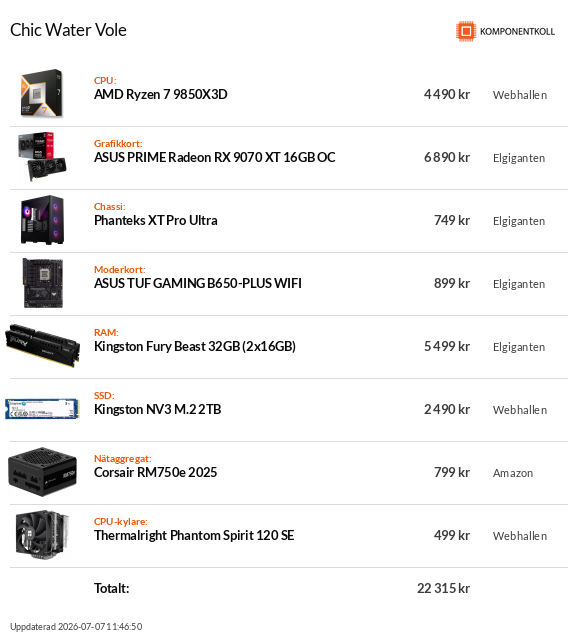
Ok, thanks, i am using this site; https://komponentkoll.se/komponenter/processor to build my own pc.

Any tips on CPU, mother board, cooling? Power?
 
Top Bottom